

Quick answer: The phrase “seo instant appear highsoftware99.com” describes someone who wants a website to show up on Google right away. Nobody can promise that. What you can do is remove anything blocking your pages, connect Google Search Console, submit a clean sitemap, link your pages together and give Google a reason to keep them. That is the legitimate route to getting indexed quickly. Ranking well takes longer.
Type “seo instant appear highsoftware99.com” or anything like it into a search box and you’ll see big promises: on Google today, page one by Friday, pay once and rank forever. Most of that is a sales line. Nobody outside Google controls when a page shows up, and anyone who guarantees rankings is selling something other than SEO.
That doesn’t leave you stuck refreshing the screen and hoping. Some steps genuinely help a new site get indexed quickly, and a few quiet mistakes can keep one invisible for months. This guide covers both, in the order I’d check them on a real launch.
What the Phrase Actually Means
The phrase mixes three ideas: SEO, the wish to appear immediately, and highsoftware99.com as a named website. People who search it usually want one of four things, and they need different answers.
- They want a URL discovered fast. The real work here is Search Console, a sitemap and internal links.
- They want to rank on page one. That’s a separate, slower job involving content quality, intent match and authority.
- They want to show up in Google’s search suggestions (autocomplete). That depends on real search behavior and can’t be switched on by hand.
- They want to be mentioned in AI-style answers. That follows the same fundamentals as normal search, covered below.
You’ll also find pages that describe “HighSoftware99 SEO” as if it were a proprietary method with fixed pillars and special principles. Google’s documentation describes crawling, indexing and quality. It doesn’t describe branded methods. Whatever label a site puts on its advice, the mechanics underneath are the same as Google’s guidance, which is why this article sticks to those.
Appearing vs Ranking: The Difference That Matters
Two different things get lumped together under “my site isn’t on Google.”
Indexing means Google has found your page, read it, and stored it in its database. An indexed page is eligible to show up in results.
Ranking is where that page lands for a specific search. It depends on relevance, quality, competition, the searcher’s location, and many signals Google doesn’t publish in full.
A page can be indexed and sit on page nine. A page can also be perfectly good and not indexed yet. When people look for ways to appear on Google fast, they usually mean the first one: they want to see their URL show up at all. That’s the part you can influence most directly, and the part this article spends the most time on.
Google is blunt about its limits: it doesn’t guarantee it will crawl, index, or serve any page, even one that follows its guidelines.
A quick diagnostic: paste a full page URL into the URL Inspection tool in Search Console. If it says the URL is on Google, you have a ranking question. If it says it isn’t, you have an indexing question. The fixes are completely different, and mixing them up wastes weeks.
How Google Finds and Indexes a Page
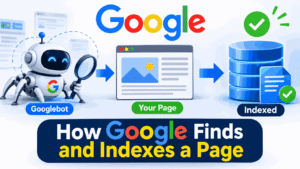
Google runs a crawler called Googlebot. It discovers pages mainly by following links from pages it already knows and by reading sitemaps. Once it has a URL, it decides whether and when to crawl it. After crawling, it processes the page, including rendering JavaScript where needed, and decides whether to store it.
Each step can stall:
- Google may never discover the URL because nothing links to it and no sitemap lists it.
- Google may discover it and delay crawling, which Search Console reports as “Discovered – currently not indexed.”
- Google may crawl it and decide not to keep it, reported as “Crawled – currently not indexed.”
- Google may be told, on purpose or by accident, to stay away or to leave the page out.
Brand-new domains carry an extra handicap: no history, no inbound links, no sign that anyone cares about the site. Google has to work that out itself. That’s why a new site is often slower than an established one, and why the honest answer to “how long?” is “it depends.” If you want the full beginner walkthrough, see our guide on how to index a new website.
You may have heard of crawl budget. For most small business sites and blogs, it isn’t a concern. It becomes a real topic on very large sites with huge numbers of URLs. If you have a 40-page site, crawl budget is not why you’re invisible.
Ponas Robotas: Meaning, Translation, and Mr. Robot Explained
Check These First: The Blockers
This is the order I check things in, and it has saved more launches than any tool. Before you buy anything or request anything, make sure you aren’t telling Google to go away.
Picture a hypothetical plumber’s website, built over a month on a staging server with the “discourage search engines” box ticked. The site goes live, the box stays ticked, and three weeks later the owner is convinced SEO doesn’t work in his town. It wasn’t SEO. It was one checkbox.
Accidental noindex
A noindex instruction tells Google not to keep a page in its index. It can be a meta tag in the page’s HTML or an X-Robots-Tag HTTP header. It’s the right tool for thank-you pages and internal search results. It’s a disaster on your homepage.
Open your homepage, view the source, and search for “noindex.” On WordPress, check the reading settings for the option that discourages search engines from indexing the site. Page builders, SEO plugins, and staging-to-live migrations all like to carry that setting over.
robots.txt mistakes
Your robots.txt file lives at yourdomain.com/robots.txt and tells crawlers which areas they may fetch. The classic launch-day error looks like this:
User-agent: *
Disallow: /
That blocks every compliant crawler from the whole site. Developers add it on staging for good reasons and forget to remove it.
There’s a subtler trap. robots.txt controls crawling, not indexing. A blocked URL can still appear in results if other pages link to it, and if you block a page that also carries a noindex tag, Google can’t read the tag at all. Don’t use robots.txt to keep pages out of Google. Use noindex for that, and leave the page crawlable so the instruction can be seen.
Other things that quietly hold a site back
- Password protection or login walls left over from staging.
- Canonical tags pointing elsewhere. A canonical tells Google which version of a page is the main one. If every page canonicalizes to the homepage, or to an old domain, Google may drop them.
- Server errors and timeouts. Cheap, overloaded hosting that returns 5xx errors or crawls along at a snail’s pace makes Googlebot back off.
- Redirect loops and long chains.
- Content that only appears after a user action, such as clicking a tab, and never loads for a crawler.
- Pages that are empty in the raw HTML until heavy JavaScript runs. Google can render JavaScript, but it adds a step and a failure point.
- Orphan pages. A page with no internal links pointing to it is easy to miss and signals that you don’t consider it important.
If a blocker exists, no amount of “Request Indexing” will fix it. For a longer diagnostic, read our guide on why your site is not showing on Google.
Set Up Search Console Properly
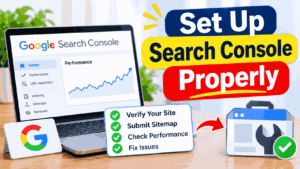
Google Search Console is free, comes straight from Google, and is the only place that tells you what Google itself sees. If you take one action from this article, take this one.
Add your site as a property. You’ll be offered two types.
A Domain property covers every subdomain and both HTTP and HTTPS versions, and is verified through a DNS record. It’s the cleaner choice if you can edit DNS. A URL-prefix property covers only the exact address you enter and offers easier verification methods, such as an HTML file or a meta tag.
Either works. Pick one and verify it. Verification is also the moment you find out who really controls your domain, which is occasionally a surprise (a former web designer’s email, say).
Once verified, two reports matter immediately: the Pages report under Indexing, which lists what is and isn’t indexed and why, and the Sitemaps report. Data takes time to populate. Don’t panic if the dashboard looks empty on day one.
Quick10sec.com Review 2026: What It Is, How It Works & Is It Worth It?
URL Inspection Tool, Step by Step
The URL Inspection tool is the closest thing to a direct conversation with Google about a single page. For a deeper tutorial, see our URL Inspection tool guide.
- Paste the full URL into the search bar at the top of Search Console.
- Read the verdict: “URL is on Google” or “URL is not on Google.”
- If it isn’t, read the reason. “Excluded by noindex tag” and “Blocked by robots.txt” point to the blockers above. “Discovered” or “Crawled – currently not indexed” are different stories, decoded below.
- Click Test Live URL to see how Googlebot fetches the page right now. This confirms whether your fix worked before you ask for anything.
- If the live test passes and the page isn’t indexed yet, click Request Indexing.
Request Indexing puts the URL in a queue for crawling. It doesn’t guarantee indexing, and Google’s help pages say so. There are also daily quotas, and submitting the same URL repeatedly doesn’t help. One request per URL is enough.
Sitemaps, Internal Links and Request Indexing
Three discovery tools work together. Use all of them, and don’t expect any single one to do miracles.
XML sitemap submission
An XML sitemap is a file listing the URLs you want Google to know about. It helps Google discover pages, especially on a new site with few inbound links. It’s a hint, not a command, and it doesn’t force indexing.
Most CMS platforms and SEO plugins generate one automatically, usually at /sitemap.xml or /sitemap_index.xml. To submit it:
- Open your property in Search Console and go to Sitemaps.
- Enter the sitemap URL and click Submit.
- Check back later for a status of “Success” and a count of discovered URLs.
Keep the sitemap clean. List only canonical, indexable URLs that return a 200 status. A sitemap stuffed with redirected, noindexed or 404 pages teaches Google to trust it less. Our XML sitemap and robots.txt setup guide covers the common platforms.
Internal links
Internal links are the most underrated way to get indexed quickly, and they cost nothing. Googlebot follows links. Link your new pages from the homepage, the main navigation, and related content, using descriptive anchor text instead of “click here.” If a new page is worth indexing, it’s worth a link from a page Google already visits often.
A simple habit helps: every time you publish, add links to the new page from at least three relevant existing pages. It takes ten minutes and does more for discovery than most paid tools.
Using Request Indexing wisely
Don’t request every URL on a 300-page site. Use it for the pages that matter most: the homepage, main service or product pages, and new cornerstone content. Let the sitemap and internal links handle the rest.
Decoding “Not Indexed” Messages
Search Console’s Pages report is where most owners get stuck, because the labels sound alike. Here’s how I read the common ones.
Discovered – currently not indexed. Google knows the URL exists but hasn’t crawled it yet. On a new site this often means Google is waiting to see whether the site deserves the crawl. Check server speed, add internal links, and make sure the sitemap is clean. Time often helps more than resubmitting.
Crawled – currently not indexed. Google fetched the page and decided not to keep it, at least for now. This almost always signals a quality or uniqueness issue. Look for thin content, near-duplicates of other pages, or a page that offers nothing beyond what already exists. Improve the page, then request indexing once.
Excluded by ‘noindex’ tag. Something on the page or in its headers says not to index it. If that’s unintentional, remove it and use the live test to confirm.
Blocked by robots.txt. Your robots.txt file stops Google from fetching the page. Edit the file, then retest.
Duplicate: Google chose a different canonical than the user. Google considers another page the main version. Check your canonical tags and whether two URLs show nearly identical content.
Page with redirect. The URL redirects elsewhere. That’s usually fine, as long as the final destination is the page you want indexed.
Not found (404). The page doesn’t exist at that address. Fix the link, restore the page or redirect it.
Google’s labels and wording change from time to time, so match what you see against the current Search Console Help pages.
Content That Gets Indexed and Kept

Getting crawled is one problem. Getting kept is another, and it’s where many new sites stall with “Crawled – currently not indexed.” Google looked and decided the page wasn’t worth storing yet.
I’ve seen this happen, in the hypothetical shape of a ten-page site where every page was a few hundred words of generic text that could have appeared on any competitor’s site. Google isn’t short on pages like that. It has no particular reason to add one more.
Pages that stay in the index tend to share a few traits:
- They answer a real question or meet a real need, with more specificity or first-hand detail than what already exists. Some analysts call this information gain: does the page add something the results don’t already say?
- They show experience. Who wrote this, and how do they know? Real photos, real examples, a real author. That’s the “Experience” in E-E-A-T, the framework in Google’s Search Quality Rater Guidelines. Raters use it to evaluate quality, and Google says it informs how its systems are designed, though it isn’t a ranking switch you can flip.
- They aren’t near-duplicates of other pages on your site or someone else’s.
- They load properly and work on a phone.
Google’s spam policies target thin pages and mass-produced pages with no real value under scaled content abuse. Publishing a hundred auto-generated pages in week one is an efficient way to make Google ignore you.
On recent updates: Google’s Search Status Dashboard shows the March 2026 core update rolling out from March 27 and completing on April 8, after a short spam update a few days earlier. Google described it as a regular update meant to surface more relevant, satisfying content. A core update doesn’t penalize a site for breaking a rule. It reassesses content quality across the web, so some pages rise and others fall. The practical lesson for a new site is the old one: publish pages worth keeping, and don’t read a ranking swing during a rollout as a verdict on your setup. Google’s own advice is to wait until a rollout finishes before drawing conclusions from your data.
Structured data from Schema.org, such as Organization, Article or LocalBusiness markup, helps Google understand what a page is about. It doesn’t make a page appear sooner on its own.
Magnexusbuzz.com Review (2026): Is It Legit, Who Runs It, and What Should You Verify?
Speed, Core Web Vitals and Page Experience
Core Web Vitals measure real-world user experience. Google’s published “good” thresholds, measured at the 75th percentile of visits, are:
- Largest Contentful Paint (LCP): 2.5 seconds or less. How quickly the main content loads.
- Interaction to Next Paint (INP): 200 milliseconds or less. How quickly the page responds to taps and clicks.
- Cumulative Layout Shift (CLS): 0.1 or less. How much the layout jumps around while loading.
Server response time (TTFB) is a useful diagnostic for slow hosting, but it isn’t one of the three Core Web Vitals.
These metrics matter for visitors and can factor into the broader ranking picture. They don’t decide whether a brand-new page gets indexed. Fix a site that takes eight seconds to load because people will leave, and because a struggling server can also slow Googlebot. Don’t expect it to unlock indexing by itself. Search Console’s Core Web Vitals report and PageSpeed Insights show where to start.
Backlinks and Mentions: What Helps, What Is Risky
Links from other sites do two useful things for a new site. They give Googlebot another path to find you, and they act as a vote of confidence.
One link from a real, relevant, already-indexed site can get a new page crawled sooner than a week of fiddling with your own settings. That’s why a mention in a local business directory, a supplier’s partner page, a local news site, or an industry association can matter more than people expect.
What works is slow and unglamorous: being listed by people who actually know you, being quoted by someone in your field, publishing something worth referencing, and asking partners to link to you. Backlinks matter, but I wouldn’t call them a shortcut. They amplify a good page and do little for a weak one.
What’s risky is the opposite. Link farms, paid link packages, private blog networks, and mass-submission tools fall under Google’s link spam policies. At best, they do nothing. At worst, they earn a manual action, a penalty applied by a human reviewer and reported in Search Console, or push your pages down algorithmically. Recovering takes far longer than the “shortcut” ever saved.
Rule of thumb: if a link exists only because you paid or arranged it to influence rankings, treat it as a liability. For more, see our piece on instant ranking scams.
Local Visibility with Google Business Profile
If your business serves a local area, Google Business Profile (GBP) is often the quickest way to be seen. It’s a separate system from your website’s indexing. A verified profile can appear in Google Search and Maps for local searches without waiting for your site to rank.
A few honest points from experience:
- Verification can be the slow part. Google may ask for a video, a postcard, or documents depending on your business type.
- The name, address, and phone number should match what appears on your website.
- Use real categories, real hours, and real photos. Keyword-stuffed business names violate Google’s guidelines and can get a profile suspended.
- Reviews matter, and you should ask customers honestly. Never buy them or reward only positive ones.
Link your website from the profile, and mention the profile or embed a map on your contact page. That gives Google two signals that the business and the site belong together. A full walkthrough is in our Google Business Profile for local visibility guide. A purely online business or one with no physical presence may not qualify, so check Google’s eligibility rules before assuming it applies to you.
Autocomplete and AI Search: What “Appear” Can Mean

Not everyone who searches this phrase means a standard result. Two other meanings come up.
Appearing in Google Autocomplete
Search suggestions are generated automatically from real search activity, language, location, and freshness. You can’t register a phrase or turn on a suggestion. What you can do is build genuine demand: become known for something specific, earn real searches for your brand or topic, and publish content people engage with. Be skeptical of anyone selling a guaranteed autocomplete placement. Google’s policies treat prediction manipulation as a problem, and fake search activity is exactly what it works to filter out.
Appearing in AI-style search results
Google’s AI features, including AI Overviews and AI Mode, draw from pages in the normal search index. Google’s published guidance says there’s no special markup or secret file needed, and the same fundamentals apply: your page must be crawlable, indexed, and eligible to show a snippet, with helpful, original content and a clear page experience. Practical habits that fit that advice:
- Answer a question directly under a clear heading, then add detail.
- Make the author and publisher easy to identify.
- Keep facts current and cite primary sources.
- Make sure important text is in the HTML, not locked inside images.
Nobody can promise a citation in AI answers, and you should treat guarantees about it the way you’d treat guarantees about rankings. Because this area moves quickly, read Google’s current Search Central guidance on AI features before you act.
Realistic Timelines: What seo instant appear highsoftware99.com Can and Cannot Mean
Here’s the part everyone wants and few people give honestly. I won’t give you a number of days, because anyone who does without caveats is guessing. Google’s documentation talks about days to weeks for new content to be crawled and indexed, and never promises a deadline. Real results vary widely.
What I can tell you is what changes the picture.
A brand-new domain with no links and a handful of pages usually sits at the slow end. Google has no history with it. Expect a gap between launch and first appearance, and don’t be surprised if only the homepage shows up at first.
A new page on an established site tends to be faster. Google already crawls the site regularly, and your internal links lead it straight to the new page.
A relaunch or migration is its own story. If you changed URLs, redirected old pages properly, and submitted a fresh sitemap, Google may take a while to reprocess everything, and traffic can dip before it recovers.
A local business with a verified Google Business Profile can show up in map results before its website ranks for anything, since GBP is a separate pathway.
A site in a crowded niche may be indexed quickly and still struggle to rank, because indexing and competing are different races.
So what can “seo instant appear highsoftware99.com” realistically deliver? If the phrase means you want your pages discoverable and eligible to show, this guide gives you the best legitimate shot at getting indexed quickly. If it means guaranteed instant page-one rankings, no honest method delivers that, regardless of who’s selling it.
Methods Compared
| Method | Best for | Typical time to appear | Relative cost | Main risk |
|---|---|---|---|---|
| Fix blockers (noindex, robots.txt, canonicals) | Every site, first step | Removes the obstacle immediately; indexing still follows Google’s schedule | Free | Missing a second blocker |
| Search Console verification + Request Indexing | Key pages on new sites | Often days to weeks, no guarantee | Free | Overusing quota; no effect if blockers remain |
| XML sitemap submission | New and large sites | Helps discovery; indexing time varies | Free | A dirty sitemap reduces trust |
| Strong internal linking | Every site | Can speed discovery of new pages noticeably | Free (your time) | Orphan pages if neglected |
| Quality backlinks and mentions | New domains, competitive niches | Slow to build, helpful once earned | Time to moderate | Paid or manipulative links risk penalties |
| Google Business Profile | Local businesses | Depends on verification; separate from site indexing | Free | Suspension for guideline violations |
| IndexNow | Sites that care about Bing and other participating engines | Fast notification to participants | Free | Google doesn’t use it, as far as its documentation shows, so don’t expect a Google effect |
| Third-party “fast indexing” tools | Rarely the right choice | Unreliable | Low to moderate | Wasted money; spam-style tactics |
Safe vs Risky Fast-Indexing Tools
Not every tool is a scam, but the category is crowded with exaggeration.
Generally safe: tools that generate and update your sitemap, monitor Search Console data or notify Bing through IndexNow. They save effort without pretending to control Google.
Worth a skeptical look: paid “submission” services that promise indexing in hours. Many do little more than ping URLs or create low-quality links. If you can’t see how it works, don’t pay for it.
Avoid: anything that blasts your URLs to thousands of spammy sites, creates doorway pages or misuses Google’s Indexing API. That API is officially intended for job posting and livestream structured data, and using it for ordinary content isn’t what Google built it for. Check Google’s current documentation, but don’t treat it as a loophole.
Before you pay for an indexing tool, check these five things. Is the site free of noindex and robots.txt blocks? Is a clean sitemap submitted? Do the new pages have internal links? Does each page offer something worth indexing? Have you requested indexing in Search Console? If any answer is no, the tool isn’t your problem.
Instant-Ranking Myths and Black-Hat Traps
Honestly, most “instant SEO” offers fall into a handful of patterns. Learn them, and you’ll save money.
“We guarantee page one.” Treat that sentence as a red flag. No one outside Google controls rankings.
“Submit to 500 search engines.” Almost nobody uses most of them. Google and Bing matter, and both offer free webmaster tools.
“Our software gets you indexed in minutes.” If a trick like that worked at scale, spammers would flood Google with junk, and Google would close the gap. Short-term tricks tend to be short-lived.
“Buy a thousand backlinks.” See the link spam policies. Manual actions are real.
“Cloak your content.” Showing Googlebot one thing and visitors another violates Google’s spam policies. So do sneaky redirects and doorway pages.
“Auto-generate a page for every keyword and city.” Scaled, low-value content is exactly what the spam policies describe.
“Repeat the keyword more.” Stuffing makes pages harder to read and doesn’t help Google understand them. I’ve read “SEO guides” that use a target phrase in nearly every paragraph and then claim to avoid stuffing. Readers notice, and so does Google.
They all promise control. Honest SEO offers influence, and influence has a lag.
How to Judge Any “Named” SEO Method or Service
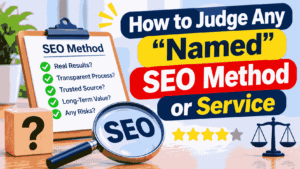
You’ll run into pages that describe a branded method, with named pillars and special principles, and attach a website’s name to it. That includes pages built around the phrase “seo instant appear highsoftware99.com.” The same questions apply to every one of them, whoever publishes it:
- Does it show a mechanism? “We improve crawlability” means little. “We fix a blocked robots.txt, submit a sitemap and add internal links” is something you can verify.
- Is there evidence? “Many users report” without data, names or screenshots is decoration. Ask for a real example you can check.
- Does it match Google’s own documentation? If a claim contradicts Search Central, trust Search Central.
- Does it promise outcomes it can’t control? Guaranteed rankings, guaranteed timelines, and guaranteed AI citations all fail this test.
- Is a real person accountable? A named author, a real company, and verifiable experience are baseline trust signals.
- Does it separate what’s known from what’s guessed? Good advice admits uncertainty.
If you’re reading this on highsoftware99.com and you offer a service, put your real details, process, and results in front of readers. Specific proof builds trust more than any method name.
DIY, Tools or Hire Someone?
Here’s a framework instead of a sales pitch.
Do it yourself if your site is small, you’re comfortable with a dashboard, and your timeline allows you to learn. Everything in the first 30 days of this guide is free, and most of it takes a few hours. The cost is your time and the risk of missing something.
Add tools if you manage many pages or sites. Sitemap generators, rank and indexing monitors, and speed testers save effort. Pick tools that report what’s true and don’t promise to control Google.
Hire a specialist if you’ve cleared the blockers, the content is solid, you’re still not indexed after a reasonable wait, or the site is large, JavaScript-heavy, or just migrated. A good SEO can read crawl logs and diagnose patterns that a dashboard can’t.
If you do hire, ask what they’ll do in the first month, what they’ll report, and what they won’t promise. Be wary of any pitch that begins with a ranking guarantee. Our guide to how long SEO really takes helps you set expectations before you talk to anyone.
Your First 30 Days Checklist
This is the sequence I’d follow for a new site. For a longer version with examples, see the First 30 Days SEO Quick Wins guide.
Days 1–3: Clear the path
- Check for noindex tags, robots.txt blocks, staging passwords, and incorrect canonicals.
- Confirm the site loads over HTTPS and on mobile without errors.
- Make sure hosting can handle a crawl without timeouts.
Days 3–7: Connect to Google
- Verify the site in Search Console, ideally as a Domain property.
- Submit a clean XML sitemap.
- Inspect your homepage and top pages, run the live test, and request indexing for the most important ones.
- Install Google Analytics, or your preferred analytics tool, so you can see what happens after people arrive.
Days 7–14: Strengthen the pages
- Rewrite thin pages so each answers a specific question with real detail.
- Link every page you want indexed from the homepage, navigation, and related content.
- Add an About page, a named author, and contact details that show who’s behind the site.
- If you’re local, start Google Business Profile verification.
Days 14–21: Earn a few real links
- Ask partners, suppliers, associations, and local directories for a listing or link.
- Publish one piece of content someone would want to reference.
- Consider Bing Webmaster Tools and IndexNow if Bing traffic matters to you.
Days 21–30: Review and adjust
- Open the Pages report in Search Console and read the reason next to every non-indexed URL.
- Fix what you can, and note what you changed and when.
- Don’t resubmit the same URLs every day.
- Check performance data. Impressions before clicks are a normal, encouraging early sign.
At day 30, don’t judge success by page-one rankings. Judge it by whether your important pages are indexed, whether Search Console shows impressions, and whether you’ve removed everything that could block you.
Keeping Your Visibility: Monitoring and Freshness
Getting indexed is a starting line. Pages that appeared fast can still slip if nobody looks at them again.
A weekly five-minute check: open Search Console and look at impressions, clicks, average position and any new indexing problems. Small changes are easier to fix early.
A monthly review, about half an hour:
- Check the Pages report for newly excluded URLs.
- Run PageSpeed Insights on your main templates.
- Look at new and lost backlinks.
- Add internal links from new content to older pages that deserve attention.
A quarterly refresh for important pages:
- Update facts, screenshots, and tool names that have changed.
- Add questions people actually search for, based on queries in Search Console.
- Swap weak sources for primary documentation.
- Improve sections where readers leave quickly.
Freshness means real editing, not changing the date. A page whose “last updated” label moved but whose content didn’t gives Google and readers nothing new, and readers can tell.
One caution on timing: after a core update, give the rollout time to finish and wait before changing a lot of pages in a panic. Look at your data over a reasonable window first.
Common Mistakes
A few errors come up so often they deserve their own list.
Launching with staging settings still on. This is the single most common cause of “my site isn’t on Google.”
Refreshing Google every ten minutes, or checking with the site: operator and treating the result as a precise count. The operator gives a rough picture, not a reliable audit. Use Search Console.
Requesting indexing for the same URL daily. It doesn’t speed anything up.
Judging the whole site by the homepage. Sometimes the homepage is indexed, and interior pages are waiting on internal links.
Chasing “instant” while ignoring content. A fast-indexed page that offers nothing gets dropped or buried.
Buying links or tools in a panic at week two. That’s usually when the bad decisions happen.
Changing the site constantly. Editing titles, URLs, and structure every few days makes it harder for Google to settle on a stable picture.
Repeating a keyword until the page reads as if a robot wrote it. Write for the person reading, and use natural wording.
FAQs
What does seo instant appear highsoftware99.com mean?
It’s a search phrase people use when they want a site to show up on Google quickly. It isn’t a recognized Google method. The realistic version is getting pages discovered and indexed sooner through Search Console, sitemaps, and internal links, with no promise on ranking.
How long does it take for a website to appear on Google?
Nobody can give an exact figure. Google’s documentation points to days or weeks for new content, and a brand-new domain with no links is often at the slower end. Fix blockers, submit a sitemap and request indexing for key pages to give yourself the best chance of appearing sooner.
Can SEO give instant results?
No. You can make a page eligible to be found quickly, but ranking takes longer and depends on competition, content quality, and authority. If someone guarantees instant page-one results, that’s a warning sign. Real SEO builds gradually, and nobody outside Google controls the timing.
What is the difference between indexing and ranking?
Indexing means Google has stored your page and can show it in results. Ranking is where that page appears for a particular search. A page can be indexed and rank poorly, so fixing one doesn’t automatically fix the other. Check indexing first, then work on ranking.
How do I get my site indexed fast?
Clear any noindex or robots.txt blocks, verify your site in Search Console, submit a clean XML sitemap, link new pages from existing ones and request indexing for your top URLs. Then make sure each page is genuinely useful. That combination is the legitimate fast route.
What is Request Indexing in Search Console?
It’s a button in the URL Inspection tool that asks Google to crawl a specific URL sooner. It doesn’t guarantee indexing, and quotas apply. Use it for important new or updated pages, once each, after making sure nothing is blocking the page.
Why is my website not showing on Google?
Common causes include a noindex tag, a robots.txt block, a brand-new domain Google hasn’t crawled yet, thin or duplicate content, or no links pointing to the site. Use the URL Inspection tool first. It tells you whether the problem is indexing or ranking and usually names the reason.
What does “Crawled – currently not indexed” mean?
Google fetched the page but chose not to store it yet. It’s usually a quality or uniqueness signal rather than a technical block. Improve the page with original detail, strengthen internal links to it, then request indexing once. Resubmitting without changes rarely helps.
Does submitting a sitemap help?
Yes, mainly for discovery. A sitemap tells Google which URLs exist, which helps most on new sites with few links. It’s a hint, not a command, so it won’t force indexing. Keep it clean: only canonical, working, indexable URLs.
Are fast-indexing tools safe?
Some are harmless, like sitemap generators or IndexNow notifications for Bing. Others rely on spam-style tactics or misuse Google’s Indexing API and can waste money or cause problems. Before paying for one, make sure the basics are covered. Most sites don’t need a tool at all.
Do backlinks speed up indexing?
A link from a real, already-indexed site can help Googlebot find your page sooner, and it signals that someone vouches for you. Paid or manipulative links don’t help and can trigger penalties. A handful of relevant, earned links beats hundreds of bought ones.
Does a new domain need time?
Usually, yes. A new domain has no history or inbound links, so Google has little to go on. That’s normal, not a penalty. Good technical setup, helpful content and a few real links shorten the wait, though nobody can remove it entirely.
Can I make my site appear in Google autocomplete or AI Mode?
Not on demand. Autocomplete reflects real search activity, and AI features draw from the normal index using the same fundamentals: crawlable, indexed, helpful pages. Build demand and trust, answer questions clearly, and be wary of anyone guaranteeing placement.
Do I need Google Business Profile for local visibility?
Not strictly, but for a local business it’s one of the best ways to be seen in local search and Maps results. It works separately from your website’s indexing. You need to be eligible, complete verification, and ensure the details match your website.
Final Summary and Your Next Step
The phrase “seo instant appear highsoftware99.com” captures a wish most site owners share: launch, then see the site on Google right away. The honest version of that wish is narrower. You can clear the blockers, connect Search Console, submit a sitemap, link your pages together, and request indexing, and that often gets a site seen sooner. You can’t buy a guarantee, and you can’t skip the part where Google decides your pages are worth keeping.
Appearing and ranking are separate jobs. Do the first with a clean setup, and the second with useful, original content over time. Treat “instant” as marketing language, keep your technical foundations tidy, and give each page a reason to exist.
